
Welcome instructors! We hope you find the information and resources on this page useful in preparing for and managing your courses. If you need additional support, please contact the Chemistry & Biochemistry Student Affairs Office.
Administrative
- Copying Resources
- Triton Prints resources.
- You can upload your documents online and have the material delivered to your office or York Hall 4010. It will require a project-task. You can obtain your course project-task by contacting an undergraduate advisor at 858-534-4856 or chemadvising@ucsd.edu.
- View all Imprints Locations
- Course Expenses
You can obtain your course fund numbers by contacting the Student Affairs Office. For lecture and graduate courses, there is a department project-task exclusively for photocopying and a separate project-task for all other (allowable) course expenses. Lab courses each have unique course project-tasks. Please note the department policy below on allowable instructional expenditures on these course funds.
Allowable expenses:
- Binders/Folders/Envelopes
- Pens/Pencils
- Chalk/Erasers
- Scantron Forms
- Paper/Index Cards
- Transparencies
Disallowed expenses:- Computer Hardware/Software
- Electronic equipment (calculators, laser pointers)
- Books (unless by exception)
If you need other course supplies not listed above, please contact the Student Affair Office to determine if it's an allowable expense.
Additional Notes:
If you require a replacement battery for your laser pointer or for classroom microphones, please do not purchase these on the course funds. The Student Affairs Office may have batteries available, or can place an order for the type needed.
All unused items that were purchased with a department course fund source should be returned to the Intake Advisor (in York Hall 4010) by the beginning of the following quarter.
- Grading
eGrades
Grades must be submitted via egrades.ucsd.edu by 11:59am on Tuesday following Finals Exam Week. For more information on eGrade, please visit: http://blink.ucsd.edu/instructors/academic-info/grades/egrades.html
Gradescope
The department is equipped with a Gradescope high speed scanner located in NSB 2303-A4 and York Hall 4030. Faculty may use this scanner for any instructional scanning needs.
Reserving Gradescope Scanner
We now have a calendar set up for scanner reservations. Using your UCSD Active Directory (AD) credentials, you will need to be logged into your Google/UCSD account at gsuite.ucsd.edu. When you access the calendar, please navigate to the icon in the bottom right corner (+Google Calendar). This icon will lead you to the respective calendar, where you will be able to schedule your Gradescope session directly onto the calendar.
Instructors and TAs will be able to access our two high speed scanners located in NSB 2303-A4 and York Hall 4030.
- To get access into NSB 2303-A4 please email chemadvising@ucsd.edu, card reader access must be added into your card at least one day in advance of your reservation.
- For York Hall 4030 scanner, it will be available only during business hours, Monday through Friday 8:30-12pm and 1-4pm, to access the room please check in at the front desk in our Student Affairs office in York Hall 4010.
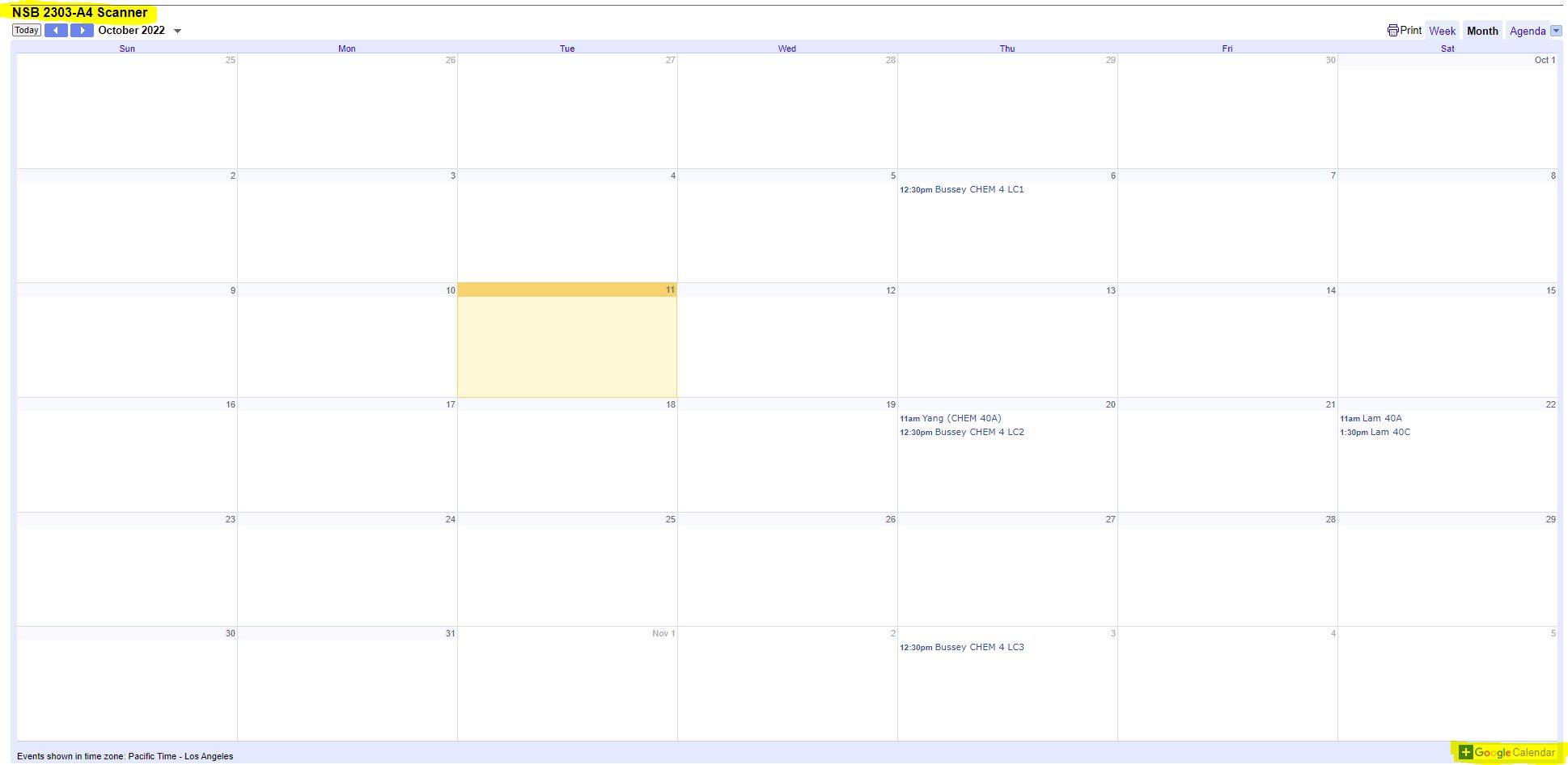
To access the scanners calendars from a web browser, please use the links below:
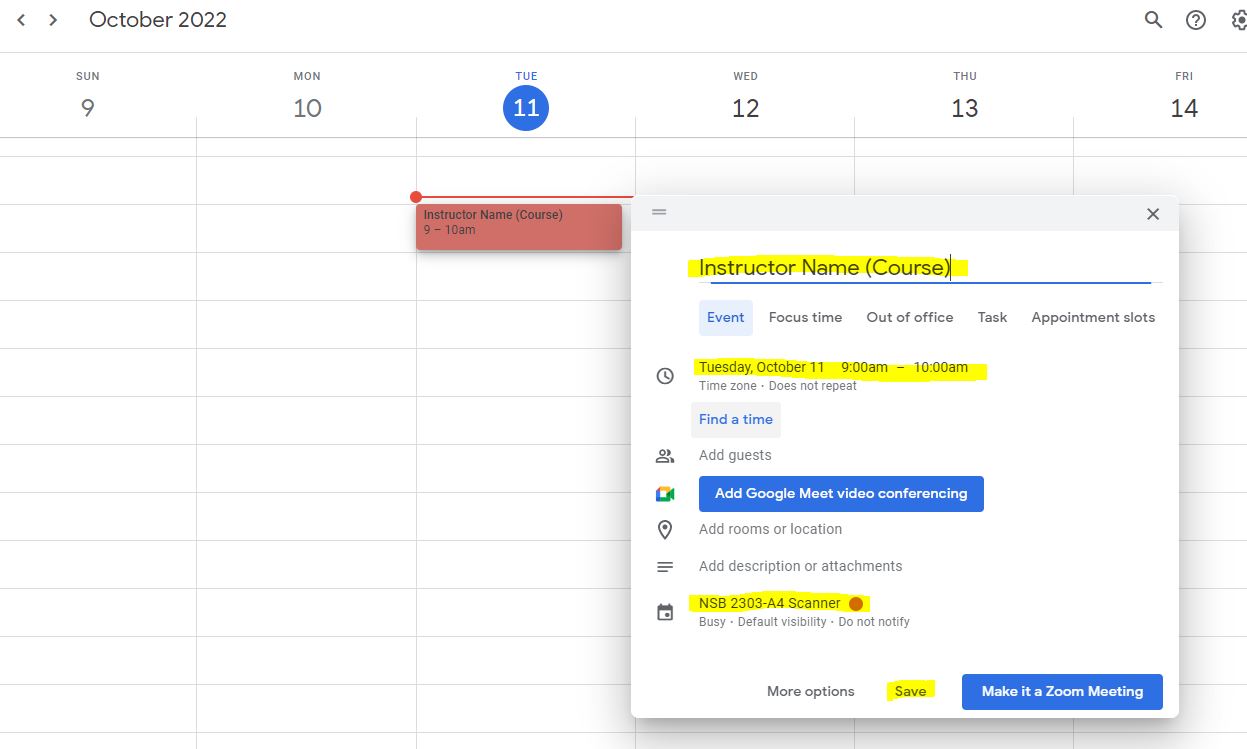
When making a reservation in the Google calendar, remember to:
- Select the date/time range you need
- Input the instructor's name and course information
- Select "Save"
New to Gradescope?
Create an instructor account at gradescope.com using your OFFICIAL @ucsd.edu email address
- Go to the Sign Up Form for Gradescope
- Click the "Instructor" button
- In the "FIRST NAME" field, enter in your first name
- In the "LAST NAME" field, enter in your last name
- In the "SCHOOL EMAIL ADDRESS" field, enter in your OFFICIAL "@ucsd.edu" UCSD email address. DO NOT use a departmental email address such as @math.ucsd.edu
- In the "SCHOOL" popup menu, choose "UC San Diego" from the list.
- In the "HOW DID YOU HEAR ABOUT US?" field, leave it blank.
- In the "INVITE CODE" field, leave it blank.
- Click the "Sign up as an instructor" button.
- If successful, a signup acknowledgement page should appear. Check your UCSD email account for a new "Welcome to Gradescope!" email from gradescope.com containing additional instructions to set up your Gradescope account (set your password, etc.). The email may take a few minutes to arrive.
- Create a Gradescope course
- OPTIONAL: To enable Gradescope integration with TritonEd for your course to simplify class roster and gradebook management, see ITS-ETS's Gradescope Integration Checklist for how to request integration.
- After ITS-ETS has notified you that Gradescope integration with TritonEd has been enabled for your course, use the "Link Course" option in Gradescope.
- Create a Gradescope assignment
- Add students
- If Gradescope integration with TritonEd has been enabled for your course, use the "Sync Roster" option to update the class roster
- Get Started
Gradescope Resources
Gradescope Guide for Instructors (PDF)
Scanner Guide (NSB 2303A4) (PDF)
Retention of Exams
Instructors are required to retain exams for at least one full quarter after the exam period (unless returned to the students). The Student Affairs Office schedules quarterly shredding, for your convenience.
Courses
- Accommodation for Student With Disabilities (OSD)
Students who are eligible for modifications, adjustments and other accommodations in their chemistry lecture or laboratory learning environments because of a disability must register with the Office for Students with Disabilities (OSD) and obtain an Authorization for Accommodation (AFA) letter.
For additional information, please contact the Office for Students with Disabilities:
858.534.4382
osd@ucsd.edu
http://disabilities.ucsd.eduOSD Syllabi Statement
The following is a sample statement to include in your course syllabus:If you have been granted an Authorization for Accommodation (AFA) letter from the Office of Students with Disabilities (OSD), you must submit your AFA letter via the online student portal (https://osd.ucsd.edu/) before any accommodations will be provided. All exam scheduling will be coordinated by you and the instructor, with involvement from the OSD Liaison as needed. In order to guarantee accommodations, you must follow the guidelines established by the Instructor and/or Liaison.
Arranging Exam Accommodations
OSD Overview
Students with testing accommodations through the Office for Students with Disabilities (OSD) will electronically submit their AFA (Authorization for Accommodation) letter through OSD’s online student portal. Once the student submits their paperwork through this portal, the course instructor and OSD Liaison (Vanessa Redondo; chemosd@ucsd.edu) will receive notification. No instructor signatures are required. Students will still be responsible for contacting their course instructor via email to have their testing accommodations met.If you have concerns about accommodations, particularly with accommodations you feel constitute a fundamental alteration to your course, please email the OSD at osd@ucsd.edu and include this subject line: Faculty Concerns about Accommodations. Your email will be addressed by the Disability Specialist working with the student or by the OSD Director. You may also considering attending one of the following OSD Fall Open Houses:
Friday, Oct. 13, 10 – 11 a.m.: https://ucsd.zoom.us/j/97584509638
Thursday, Oct. 26, 1 – 2 p.m.: https://ucsd.zoom.us/j/95710181318
Tuesday, Nov. 7, 3 – 4 p.m.: https://ucsd.zoom.us/j/98745203576
Wednesday, Nov. 29, 2 – 3 p.m.: https://ucsd.zoom.us/j/92574966905Online Tests
If you have students with OSD accommodations and your class has online tests/quizzes/exams: as course instructor, only you will be able to adjust testing time online for remote assessments, so the OSD Liaison cannot assist with administering or scheduling any OSD tests for remote tests. Students taking remote assessments are told to work with their course instructor (and/or TA) exclusively.(For remote assessments) How to set up quizzes and assignments in Canvas
For In-Person Test please refer to the TTC drop down in this page.
Department OSD Contact
Vanessa Redondo: chemosd@ucsd.edu
- Classroom Demonstrations
For more information on classroom demonstrations that are available in the department, please visit: http://chem-web.ucsd.edu/undergraduate/teaching-labs/demos/ or contact Peter Wotruba (pwotruba@ucsd.edu).
- Commencement of Academic Activity Requirement
Commencement of Academic Activity Requirement (Action Needed by January 20th)
Beginning in Summer 2022, UC San Diego implemented a new tracking process to monitor the commencement of academic activity for all undergraduate level, graduate level, and professional level students as required by the U.S. Department of Education (see the notice from the EVC).
What counts as “academic activity” for this requirement?
Per the Department of Education, academic activity includes:- Attending class
- Submitting an assignment
- Taking a quiz or an exam
- Participating on a discussion board, or
- Talking with the instructor about the class or subject matter
When do I need to do this during the term?
Instructors should certify their students by the end of business on Friday of the first week of instruction in summer sessions
How do I certify that a student has commenced academic activity in my class?
You can certify activity in your classes using either of two methods.
- The first method is through the Academic Activity Tracking System (https://aats.ucsd.edu). Using this system you may easily certify the commencement of academic activity for students in all of your classes. Instructions for manual certification can be found at https://blink.ucsd.edu/instructors/academic-info/caa/index.html#Manual-certification-through-CA.
- The second method is to assign a #FinAid activity in Canvas. When a student completes a #FinAid assignment the requirement will be automatically satisfied for the class. You do not need to do both methods. Instructions on certification through Canvas can be found at https://blink.ucsd.edu/instructors/academic-info/caa/index.html#Certification-through-Canvas.
If you have questions, please contact Thom Bussey (tbussey@ucsd.edu).
- Concurrent Enrollment (UCSD Extension)
Extension Concurrent Enrollment students are non-matriculated, non-degree-seeking students who wish to take courses at UCSD. Since they are not matriculated students, they do not need to enroll in courses through TritonLink and their names will not appear on your regular class rosters.
Grades: Grades for Concurrent Enrollment students can be entered in eGrades only during the first login. After that point, regardless of whether a grade was posted or not, Concurrent Enrollment students will not appear in eGrades and grades will have to be submitted on hard copy grade sheets. If you need copies of final grade sheets, please contact (858) 534-3420 or concurrent@ucsd.edu.
International Students UPS: The University and Professional Studies (UPS) program allows international students to enroll in UCSD courses through Extension’s Concurrent Enrollment program. Each UPS student has been carefully screened before being allowed to take UCSD courses by UCSD Extension’s UPS admissions team. Transcripts showing above-average to outstanding academic performance at the student’s home university and proof of advanced English proficiency are required as admissions criteria in their application review process. Extension international students in the Concurrent Enrollment program are held to high academic standards in their UCSD courses and are expected to earn grades of “B” or better in each course.
Note that Extension’s UPS advisors may request mid-quarter grades to help advise their students. Since the Extension advisors serve as the Academic Advisors for UPS students, campus privacy policy allows you to share grade information with them.
- Course Evaluations (CAPES)
Course And Professor Evaluations (CAPE)
By Week 8, students will receive an email notice inviting them to evaluate your course via CAPE. The evaluation system will remain open to students until the first day of Final Exams. After final grades are submitted, tyou may view the CAPE results will be made available via http://cape.ucsd.edu/.
- Prerequisite Waiver
We utilize the EASysystem to allow students to request to waive prerequisites to enroll in your course. It is up to the instructor to decide whether a particular student should be allowed to enroll in the class without completing the established prerequisites. You may notify the Student Affairs Office via email (chemadvising@ucsd.edu) if you would like certain request to be auto-approved/denied. All other requests will be forwarded to the instructor.
- Spartan
UC San Diego faculty, staff, and students can download and run Spartan directly on their computers. Please use the resources below to get started:
Installation: Follow these Spartan Installation Steps
Spartan Installation Steps Tutorial: View the Spartan Tutorial
Spartan Tutorial General: Visit the UCSD Blink Spartan Page
UCSD Blink Spartan Page
- Special Studies (CHEM 99, 197, 199)
Once students submit their Special Studies application (deadline: Friday of week 1), the system will require PI approval. Please look out for an email from the Enrollment Authorization System (EASy) where you will be directed to review and approve any students requesting to enroll in CHEM 99, 197, or 199 under your supervision.
- Student Concerns
Please contact Student Affairs at chemadvising@ucsd.edu if you need assistance with a student of concern.
Counseling and Psychological Services (CAPS)
Help a Student Who Has Been Sexually Assaulted
- Technology Resources
Educational Technology Services
- Audio/Visual Services - Most classrooms are equipped with a self-serve media station, which includes a computer projector, DVD/CD/VCR, and MP3 player. For immediate technical support, contact the ACMS classroom support line at (858) 534-5784. To view a classroom's particular features, visit the Classroom Details webpage.
- Podcasting of lectures is available to classes scheduled in podcast-ready lecture halls.
- Canvas - For more information about creating a new course site please visit EdTech. To build a course website please contact canvas@ucsd.edu.
- iClicker - For more information on the student response iClicker system, contact ACMS at clickers@ucsd.edu and visit the iClicker website.
Accounts / Access
- Active Directory (AD) is for access to e-mail, the UCSD-PROTECTED wireless network, Virtual Private Network (VPN), ACMS computer labs, and TritonEd/Canvas.
- UCSD Email Account - Your AD account is also your UCSD email address, which you will be issued upon being hired. You can access your mail at: https://mail.ucsd.edu.
- Single Sign-On (SSO) is for access to Blink Instruction Tools (i.e. class lists) and eGrades. (NOTE: You must self-register for your SSO account here: https://a4.ucsd.edu/selfreg/supplyemail.do
- Textbooks/ Course Materials
Textbook Adoptions
You will receive an email from the UCSD Bookstore (Follet Discover) with information on how to access the online textbook adoption tool shortly before the Schedule of Classes is released for the quarter you are teaching. This email will include a personalized link which will take you to your specific courses.You will be given the option to review your courses and select the materials you wish to adopt. You will also be given the option to indicate if no texts/materials are required or if you will be making materials available through your course page or other means. The UCSD Bookstore will try to accommodate late requests, though desk copies and bookstore availability cannot be guaranteed in time for the start of instruction.
Course Reserves
Please indicate if you'd like your course textbook or supplemental materials available through Reserves by adding a note in the Verba system when adopting your texts.
Achieve Homework
If you'd like to use Achieve Homework please contact our publishing representative Lauren Arrant. Please include the following information to set up your course:
- Course name
- Textbook
- Chapters covered
- Any sections omitted
To add a Teaching Assistant to your course please email Lauren with the TAs full name and email address along with your course details. Our Client Specialist will send all login information directly to the TAs.
- Triton Testing Center (TTC)
The Triton Testing Center (TTC) will provide secure and integrous testing services to students who need to take their paper-based tests outside the time and space constraints of the classroom (OSD included). The TTC is not equipped to host computer-based tests at this time.
In-Person Tests
If you have students with OSD accommodations and your class has in-person tests/quizzes/exams: as course instructor, you have two choices:1. You may choose to take care of any exam/testing accommodations yourself. If you need a room (or multiple rooms) for exam taking, you can simply fill out our room reservation form and our Student Affairs staff will be happy to locate a room for you to place your student(s) with OSD accommodations. You are encouraged to use your Teaching Assistants to proctor these exams. You may also use proctors from the Academic Integrity (AI) Proctor pool, in order to free up your TAs for OSD exams. AI Proctors are not allowed to be used for OSD exams, hence the proctor switch.
2. You may choose to have your exams hosted at the Triton Testing Center. The deadline to register your exams for this option is Friday of Week 2. In order to do this, you will need to complete the following:
- The TTC uses the system RegisterBlast to schedule exams. You will need to establish an account with the system first. It will take around 1 business day for approval. More information is here: https://tritontesting.ucsd.edu/instructors/getting-started.html
- You will then need to register your exams (essentially creating the exam in the system for student sign-up). You do not need the exam PDF or specific instructions before Week 2, only the testing dates/window.
- Instruct your students to create their accounts and sign up for a testing slot.
- After student's have completed their exams, you may access a PDF scan of the exams or pick up the hard copies at the TTC in Pepper Canyon.
- If the TTC is not able to accommodate all of your students (which may be likely if you have many students with an "alone" space accommodation), you may contact the OSD Liaison (chemosd@ucsd.edu) for alternate arrangements.
Important Note: The department will also utilize Register Blast to view information in cases where we need to assist with exams so registration is imperative.
The Proctor Pool is also available to assist faculty with proctoring tests that occur in the classroom. As a course instructor, you can request in-class proctors using this form.
- Other Course Resources
Class Lists (Use your SSO account. If you do not have access, please contact the Student Affairs Office)
Policies
- Academic Integrity
Integrity of scholarship, otherwise known as academic integrity, is essential for an academic community. Academic integrity is the courage to engage in the academic community only in ways that are honest, respectful, responsible, fair and trustworthy. Academic integrity is essential because the University has the privilege and great responsibility to educate and certify the next generation of scholars, professionals, and citizens. Without academic integrity, the degrees we confer, the research we conduct and our reputation all lose value.
Student academic integrity is a teaching and learning issue. All instructors can create a classroom of integrity, in which cheating is the exception and integrity the norm, by learning how to:
- communicate integrity
- reduce temptations and opportunities for cheating, and
- respond to cheating (no matter its form) when it occurs.
All instructors should at least insert the following statement in all syllabi:
“Academic Integrity is expected of everyone at UC San Diego. This means that you must be honest, fair, responsible, respectful, and trustworthy in all of your actions. Lying, cheating or any other forms of dishonesty will not be tolerated because they undermine learning and the University’s ability to certify students’ knowledge and abilities. Thus, any attempt to get, or help another get, a grade by cheating, lying or dishonesty will be reported to the Academic Integrity Office and will result sanctions. Sanctions can include an F in this class and suspension or dismissal from the University. So, think carefully before you act. Before you act ask yourself the following questions: a) is my action honest, fair, respectful, responsible & trustworthy and, b) is my action authorized by the instructor? If you are unsure, don’t ask a friend—ask your instructor, instructional assistant, or the Academic Integrity Office. You can learn more about academic integrity at academicintegrity.ucsd.edu” (Source: Academic Integrity Office, 2017)
And, all instructors should report violations of academic integrity when they are suspected. Instructors can report online via this Faculty Reporting Tool or by emailing aio@ucsd.edu with questions or for consultation.
Dr. Bertram Gallant, the Academic Integrity Director, is available for consultation with faculty. She can be reached directly at 858-822-2163 or tbg@ucsd.edu.
- Academic Senate Policies
- Lab Drop Policies
1. General Drop Deadline for Lab Courses:
The deadline to drop a chemistry lab without a "W" is the end of the second scheduled lab meeting. “W” grades will be assigned to students who drop after the end of the 2nd lab meeting and Fri, Week 6. Student Affairs runs a report to identify students who dropped after the deadline and submits the list to the Registrar’s to assign a W grade. More information can be found here.
2. Policies for lab attendance at the first lab meeting:
Students who miss the first 30 minutes of the first lab meeting of the quarter will be administratively dropped from the course. These students will not receive a “W” grade.
Students may be granted exceptions to this policy for extenuating circumstances. Any exceptions to this policy is at the discretion of the instructor. The instructor must notify Student Affairs (chemadvising@ucsd.edu) and Mary Sever (msever@ucsd.edu) no later than noon on the day after the first lab meeting if there are any students who should be granted an exception.
Lab staff will send the list of administrative drops to the Registrar’s.
3. Policies regarding the lab safety requirement:
Students who do not pass the Lab Safety Exam by the start of the first lab meeting will be administratively dropped from the lab course with a “W” grade.
The Lab Safety Coordinator (Mary Sever) oversees this process and is responsible for student notices regarding exams, re-exams, and consequences for non-compliance. Mary will send a list of students who have not passed the exam to the instructor.
After the instructor receives this list, they have the authority over making a final decision to drop student(s) from the lab course. Any exceptions to this policy (e.g. approval for a re-exam) is at the discretion of the instructor. The instructor must inform Mary which students should be dropped, and who (if any) should be granted an exception. Mary is responsible for notifying Student Affairs (chemadvising@ucsd.edu) of the instructor’s final drop decisions (with a cc to the instructor), and Student Affairs will send the final notice to the Registrar’s office, requesting that these students be dropped. Student Affairs will also send final notification to these students, informing them that they will be dropped.
- Return to Learn Resources
Important Notes and Considerations for Classes
- You may be getting emails from your students asking for a remote modality of your class. Please note that students registered for in-person courses are expected to participate in all required in-person activities. However, an in-person modality allows for substituting up to 50% of planned instructor-student interaction time as remote (this does not include office hours, which can always be remote/via Zoom). You may refer students to Chem Advising (chemadvising@ucsd.edu) or VCUE Thom Bussey (tbussey@ucsd.edu) if they have additional questions about in-person coursework.
- Masking is currently optional in classrooms, and labs.
- Instructors/TAs are not allowed to ask students about their vaccination status. However, any University official (faculty and TAs included) can ask a student to provide evidence of compliance with safety regulations (e.g. using the daily symptom screening app).
- We worked with many students in previous quarters who dealt with challenges in their courses due to COVID and other health issues. We suggest having a policy on absences, make-ups and grading policies (if applicable) for students who have health issues during your courses outlined in your syllabus.
- Some syllabus verbiage, possible course policies, and a variety of campus resources can be found in the Inclusive and Resilient Course Policies and Practices document.
Department COVID-19 Instructor Resources (SSO Required)
- Student Confidentiality (FERPA)
Student FERPA Rights: http://ucsd.edu/catalog/front/ferpa.html
Posting Grades: You may not publicly post grades (including on websites) using any personal identifier that could be recognized by third parties.
Returning Exams: Instructors must provide secure procedures for returning graded examinations. Exams are usually returned to students in discussion sections or lectures by faculty or teaching assistants. Exams may only be left in a secure location for retrieval by the student provided he or she has signed a waiver*.
*Buckley Waiver: STUDENT CONSENT FOR RELEASE OF STUDENT INFORMATION. I hereby authorize Professor _______ to return my graded examination by placing it in a location accessible to all students in the course. I understand that the return of my examination as described above may result in disclosure of personally identifiable information, that is not public information as defined in UCSD PPM 160-2, and I hereby consent to the disclosure of such information.
Teaching Assistants
- Teaching Assistants (TA)
https://Sign Up Sheet If your course is eligible for TAs, you will receive your TA assignments from up to two weeks prior to the start of the quarter. A full-time TA is typically assigned to three discussion sections or one laboratory section, and the workload would be up to 17 hours per week on average. A part-time TA will typically be assigned to two discussion sections, and the workload would be up to 11 hours per week on average. An undergrad Tutor or UGIA will be assigned to one section and is expected to work about 10 hours per week.
New TA Checklist (Includes helpful information on expectations/responsibilities to cover during your first meeting with TAs).
- TA Office Hours
TA office hours are located in York Hall 2200. An online Sign-up sheet will be emailed to the TA(s) just prior to the start of the quarter. If they require a different office space, please contact chemadvising@ucsd.edu.
If York Hall 2200 needs additional course supplies (markers, erasers, etc.) please contact Student Affairs.